
The Architecture of a Secure Cloud
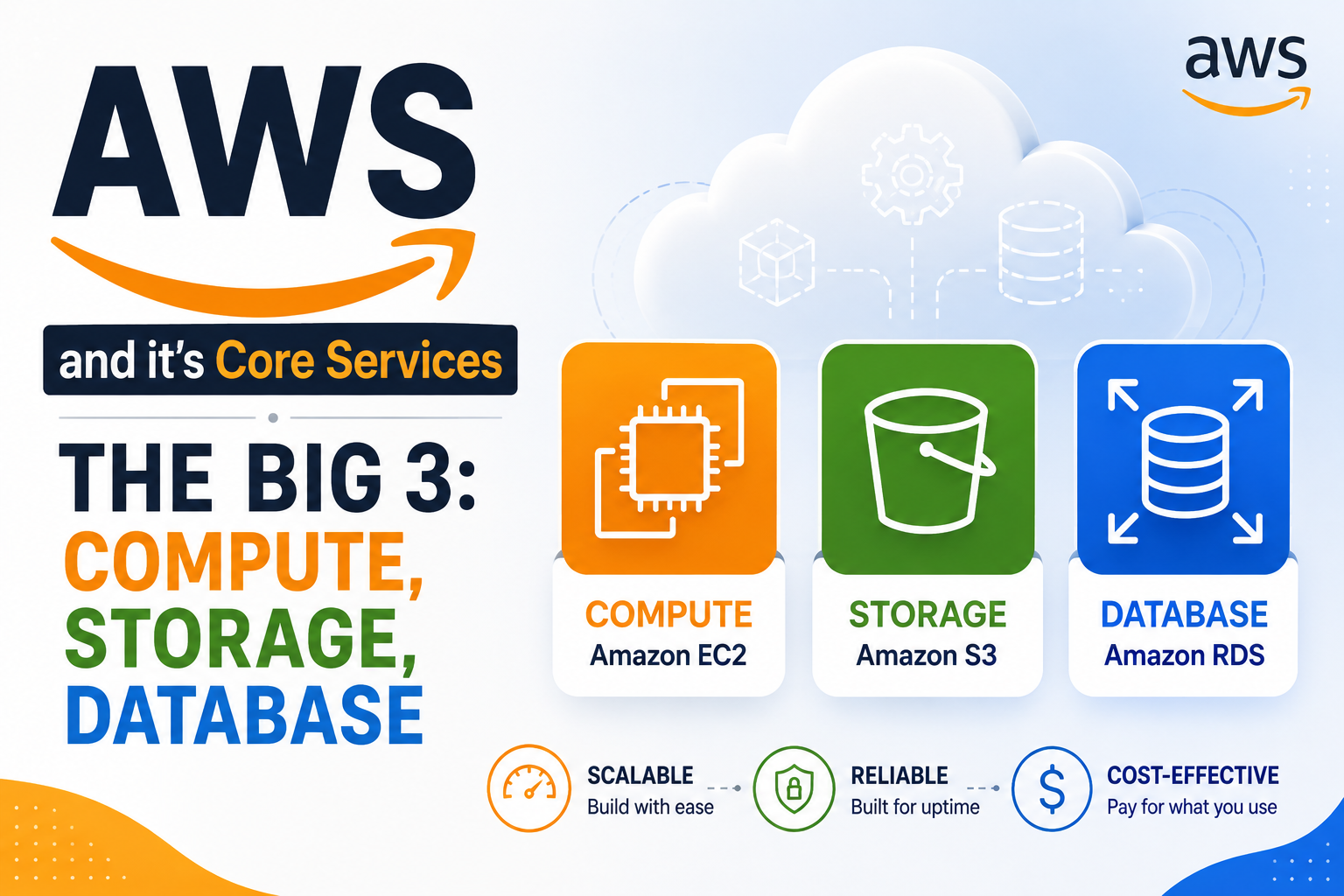
In the previous blog, we explored the core building blocks of AWS: EC2 for compute, S3 for storage, and RDS for databases. However, compute and storage are nothing without a secure, well-structured network to host them. This is where Amazon VPC (Virtual Private Cloud) and AWS Identity and Access Management (IAM) come into play. If the "Big 3" services are the rooms of your house, VPC is the foundation and walls, and IAM is the lock on every door.
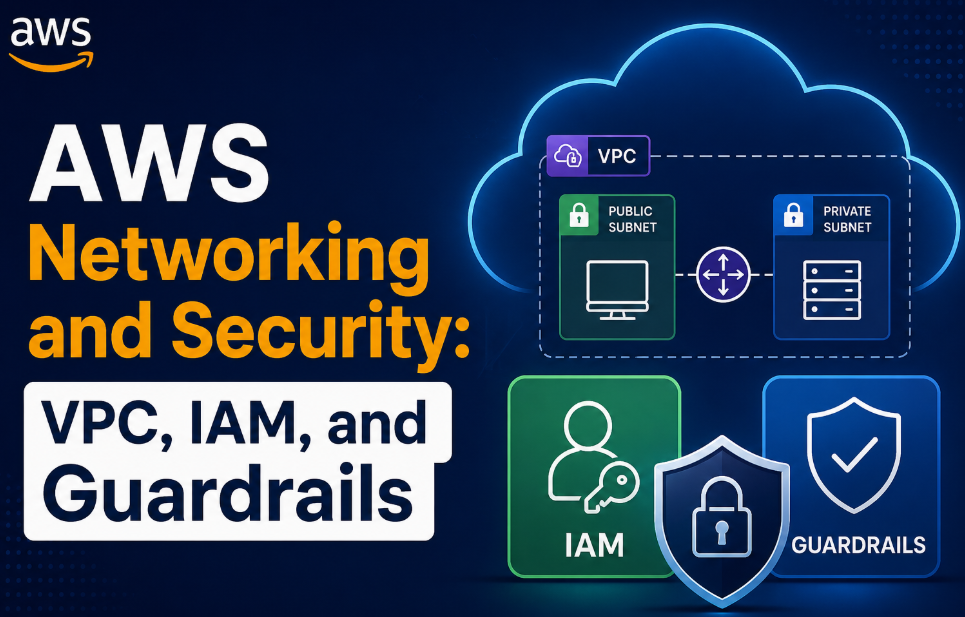
This blog will explain the critical concepts of AWS networking, from subnets to route tables, and the security services that protect your resources. We will then apply this knowledge by building two practical projects that illustrate these concepts in action. This is where theory meets practice, and where an architect's mindset is truly forged.
VPC
A Virtual Private Cloud (VPC) is a logically isolated section of the AWS Cloud where you can launch AWS resources in a virtual network that you define. It is your private slice of the AWS cloud .
Subnets
A VPC spans all the Availability Zones (AZs) in a Region. To place resources, you divide your VPC's IP address range (CIDR block) into smaller networks called subnets.
-
Public Subnets: These are subnets that have a direct route to the Internet Gateway. Resources in a public subnet, like web servers, can receive traffic from the internet, but only if they have a public IP address and their Security Group allows it.
-
Private Subnets: These subnets do not have a direct route to the Internet Gateway. Resources here, like application servers and databases, are isolated from direct internet access. This is crucial for security, especially for your databases .
Internet Gateway (IGW)
An Internet Gateway is a horizontally scaled, redundant, and highly available VPC component that allows communication between your VPC and the internet. It is the "door" through which traffic enters and leaves your public subnets .
NAT Gateway
A NAT (Network Address Translation) Gateway enables instances in a private subnet to connect to the internet or other AWS services, but prevents the internet from initiating a connection with those instances. This is how your private application servers can download security patches or send logs to CloudWatch without being exposed to inbound attacks . A NAT Gateway is placed in a public subnet and requires an Elastic IP address .
Route Tables: The Traffic Police
Route tables contain a set of rules, called routes, that determine where network traffic from your subnet is directed. Every subnet must be associated with a route table.
-
Public Route Table: Contains a route that directs internet-bound traffic (
0.0.0.0/0) to the Internet Gateway . -
Private Route Table: Contains a route that directs internet-bound traffic (
0.0.0.0/0) to the NAT Gateway . This is how private instances get outbound internet access.
VPC Peering vs. Transit Gateway
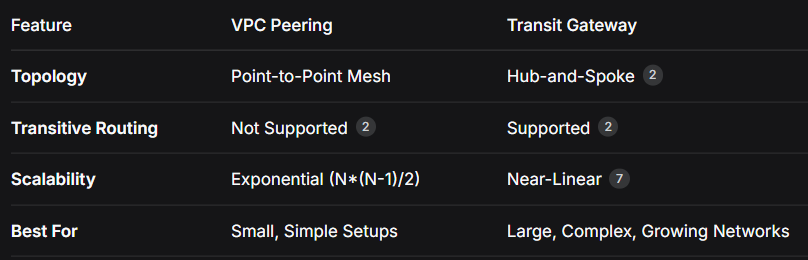
As your architecture grows, you may need to connect multiple VPCs to each other. AWS offers two primary solutions for this: VPC Peering and Transit Gateway.
VPC Peering
VPC Peering is a networking connection between two VPCs that enables you to route traffic between them using private IPv4 or IPv6 addresses .
-
Topology: It's a point-to-point connection. If you have five VPCs and want them all to talk to each other, you need ten peering connections .
-
Limitation: It is not transitive. If VPC A is peered with VPC B, and VPC B is peered with VPC C, VPC A cannot reach VPC C through VPC B .
-
Best For: Small, simple environments (typically 2-4 VPCs) where a mesh network is manageable, cost is a primary concern, and there is a simple, stable topology .
Transit Gateway
Transit Gateway (TGW) acts as a central hub for connecting your VPCs and on-premises networks. It simplifies connectivity and is a core component of a hub-and-spoke model .
-
Topology: Every VPC (spoke) attaches to the central Transit Gateway (hub) once. This scales linearly, making it perfect for large and growing environments .
-
Key Feature: It supports transitive routing. Any spoke VPC can reach any other spoke VPC through the TGW, eliminating the need for a full mesh .
-
Best For: Multi-account environments, organizations with five or more VPCs, or architectures that require centralized routing governance, network segmentation, or hybrid connectivity .
IAM
AWS Identity and Access Management (IAM) is a global service that enables you to control access to AWS resources securely. In the cloud, the principle of least privilege is paramount .
Core IAM Concepts
-
Users: An entity that represents a person or application that interacts with AWS.
-
Groups: A collection of IAM users. Permissions applied to a group are inherited by all its members.
-
Policies: Documents that define permissions. They specify what actions are allowed or denied on which resources . A best practice is to be explicit, specifying exact API actions and resource ARNs instead of using wildcards (*) .
-
Roles: An IAM identity that you can assume to gain temporary permissions. Roles are ideal for granting permissions to AWS services like EC2 instances or Lambda functions .
-
Permissions Boundaries: An advanced feature that sets the maximum permissions an identity-based policy can grant to an IAM entity. This acts as a preventive guardrail, ensuring no user or role can escalate their privileges beyond a defined ceiling .
The Principle of Least Privilege
This principle dictates that you should grant only the permissions required to perform a specific task. Any additional permissions are a security risk, as they could be exploited in the event of a breach . The infamous Capital One breach was a stark reminder of this, where an overly permissive IAM role attached to a web application firewall allowed an attacker to read data from over 700 S3 buckets .
How to Implement Least Privilege:
-
Start with a broad policy in a development environment and run your workload.
-
Use IAM Access Analyzer to generate a fine-grained policy based on the actions your workload actually invoked from CloudTrail logs .
-
Use Service Control Policies (SCPs) at the AWS Organizations level to enforce compliance rules across all accounts .
Security Groups vs. NACLs
AWS provides two types of firewalls to secure your resources: Security Groups and Network Access Control Lists (NACLs). They work best together .
Security Group (Instance-Level Firewall)
-
Scope: Applied to individual resources like EC2 instances, RDS databases, and ENIs .
-
State: Stateful. If you allow inbound traffic, the outbound response is automatically allowed, regardless of outbound rules .
-
Rules: You can only specify
ALLOWrules. There is no explicitDENY; if a rule doesn't allow a traffic type, it's implicitly denied . -
Evaluation: All rules are evaluated before a decision is made.
Network ACL (NACL) (Subnet-Level Firewall)
-
Scope: Applied to entire subnets. All resources in a subnet inherit the NACL rules .
-
State: Stateless. You must explicitly specify both inbound and outbound rules, as responses to allowed traffic are not automatically allowed .
-
Rules: You can specify both
ALLOWandDENYrules. They are evaluated in numerical order, with the lowest number taking precedence . -
Evaluation: Rules are evaluated in order, and the first rule that matches the traffic is applied.
How They Work Together
Traffic must pass through both the NACL (at the subnet level) and the Security Group (at the instance level) to reach a resource . A common best practice is to use NACLs for coarse-grained, broad controls (like blocking an entire IP address range) and Security Groups for fine-grained, instance-level access control .
Project 1: Build a Three-Tier VPC from Scratch
This project will take you through the steps of building a foundational network. This is the standard AWS networking design you will see in production environments .
Objective
Create a VPC with a public and a private subnet for a standard web application.
Step-by-Step Instructions
-
Create a VPC
-
In the AWS Console, navigate to the VPC service.
-
Click "Create VPC".
-
Provide a name, e.g.,
My-3Tier-VPC. -
Specify an IPv4 CIDR block, e.g.,
10.0.0.0/16. -
Leave Tenancy as
Defaultand click "Create".
-
-
Create Subnets
-
Navigate to "Subnets" and click "Create subnet".
-
Select the VPC you just created.
-
Create one public subnet in
ap-south-1awith CIDR10.0.1.0/24. -
Create two private subnets: one in
ap-south-1a(10.0.2.0/24) and another inap-south-1b(10.0.3.0/24) for high availability .
-
-
Create and Attach an Internet Gateway
-
Navigate to "Internet Gateways" and click "Create internet gateway".
-
Name it
My-IGWand click "Create". -
Select the gateway, click "Actions", and choose "Attach to VPC".
-
Select the VPC you created and click "Attach" .
-
-
Create a NAT Gateway (for the Private Subnet)
-
Navigate to "NAT Gateways" and click "Create NAT gateway".
-
Select the public subnet (
10.0.1.0/24). The NAT gateway must be in a public subnet. -
Allocate an Elastic IP and click "Create NAT gateway" .
-
-
Configure Route Tables
-
Public Route Table: A main route table exists by default, but it's best practice to create a custom one.
-
Create a route table named
My-Public-RT. -
Select it, go to the "Routes" tab, and click "Edit routes".
-
Add a route:
0.0.0.0/0-> Target:igw-xxxxxxxxx(your Internet Gateway). Click "Save changes" . -
Associate it with your public subnet. Click the "Subnet associations" tab, then "Edit subnet associations", and select your public subnet.
-
Private Route Table: Create a route table named
My-Private-RT. -
Edit routes and add a route:
0.0.0.0/0-> Target:nat-xxxxxxxxx(your NAT Gateway) . -
Associate it with your two private subnets.
-
Result
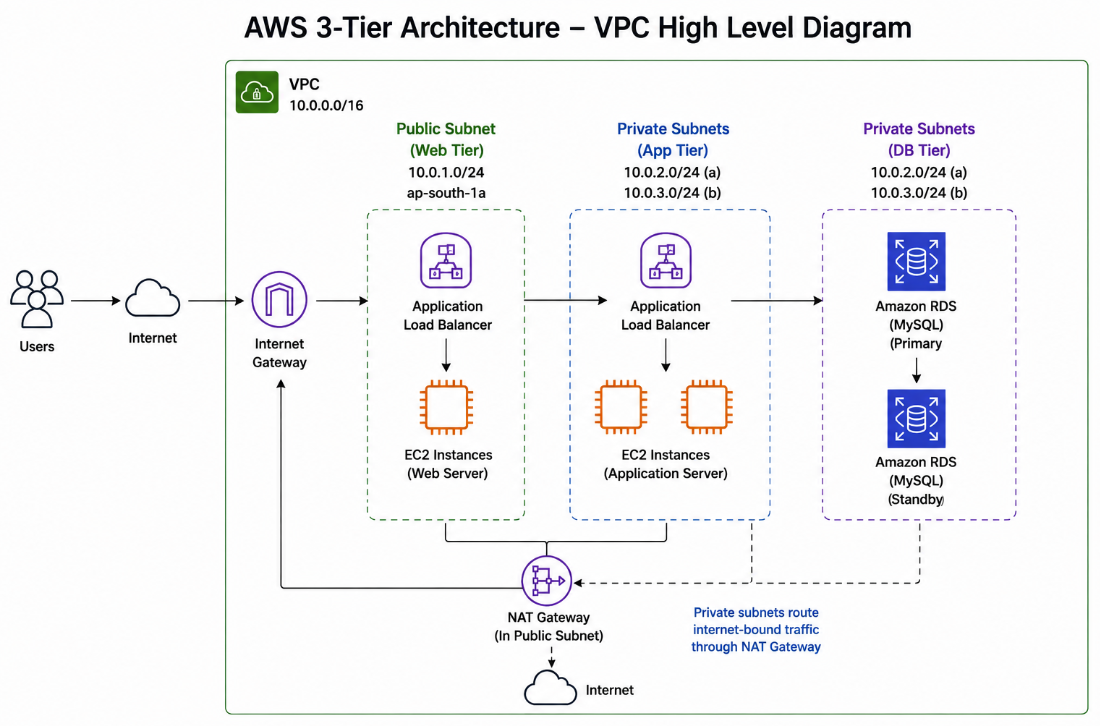
You have successfully built a VPC with a public and a private subnet. Resources in the private subnet can access the internet for patching (via the NAT Gateway) but cannot be reached directly from the internet .
Project 2: Deploy a 3-Tier Application
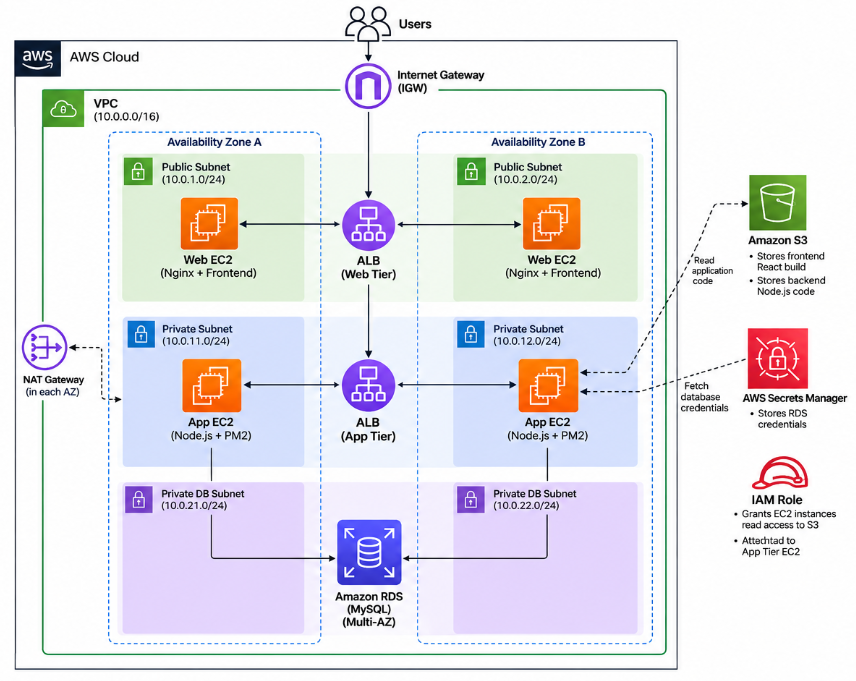
This project builds on the first one, deploying a complete, secure, and scalable application using EC2, S3, RDS, and the VPC we just created .
Architecture Design
-
Web Tier: Located in public subnets. Hosted on EC2 instances behind an Application Load Balancer. Serves the static frontend (e.g., React) to users .
-
Application Tier: Located in private subnets. Hosted on EC2 instances that run the backend business logic (e.g., Node.js). This tier communicates with the database .
-
Database Tier: Located in private subnets. An Amazon RDS instance in a Multi-AZ deployment for high availability .
Step-by-Step Implementation
-
Network & Security Setup
-
Use the VPC, subnets, route tables, IGW, and NAT Gateway you created in Project 1.
-
Create Security Groups:
-
Web Tier SG: Allow inbound HTTP (port 80) and HTTPS (port 443) from
0.0.0.0/0. -
App Tier SG: Allow inbound traffic from the Web Tier SG on the application port (e.g., 4000).
-
Database SG: Allow inbound MySQL/Aurora traffic (port 3306) from the App Tier SG .
-
-
-
Setup Database (RDS)
-
Navigate to RDS and create a database (e.g., MySQL).
-
Select your VPC and choose the private subnets.
-
Attach the Database SG and store the credentials in AWS Secrets Manager .
-
-
Setup Storage (S3)
-
Create an S3 bucket to store your application code (frontend React build and backend Node.js code).
-
Create an IAM Role with permissions to read from this S3 bucket. Attach this role to the EC2 instances in the App Tier .
-
-
Setup Application & Web Tier (EC2)
-
Launch an EC2 instance in the App Tier (private subnet) with the IAM role. Use a user-data script to:
-
Install Node.js and PM2.
-
Copy the code from S3.
-
Configure database connections with credentials from Secrets Manager .
-
-
Launch EC2 instances in the Web Tier (public subnet). Use a user-data script to:
- Install Nginx and serve the frontend code from S3 .
-
Place both tiers behind Application Load Balancers (ALB) for high availability and fault tolerance .
-
Books & Learning Resources
Recommended Books
-
AWS Certified Solutions Architect Study Guide (SAA-C03) by Gyan Prakash Upadhyay
- Excellent for understanding architecture patterns and the decision-making process behind building secure and resilient systems.
Online Documentation
-
AWS VPC Documentation
-
The official guide to VPCs, subnets, route tables, and network security.
-
AWS Well-Architected Framework
-
The definitive guide to the five pillars of a well-architected system, including security and reliability.
Youtube Channels
- Train With Shubham
- Gaurav Sharma
The strongest architectures are not built on a single service, but on a foundation of secure, well-thought-out networking. In the next blog, we'll see how containers and serverless change the game. 🚀